Private S3 Storage With Pre-Signed URLs
A private S3 bucket is not an authorization system. The application decides who may see a file, then hands out a short-lived pre-signed URL.
RE/AMP stores contracts, documents, and property photos for several companies. Those files must stay private, and each company must see only its own.
Making an S3 bucket private is the first step. It is not the whole answer.
The problem
A private bucket stops the public from reading files. It does not know which signed-in user belongs to which company, or which user may open which property.
That knowledge lives in the application. So the application, not the bucket, has to be the authority.
The pattern
- The browser asks the application for a file, with the user’s session.
- The application checks that the user is signed in, belongs to the company, and has permission for that property.
- If the checks pass, the application creates a pre-signed URL that lasts a short time.
- The browser uses that URL to talk to S3 directly.
The file never passes through the application server, and the URL expires on its own.
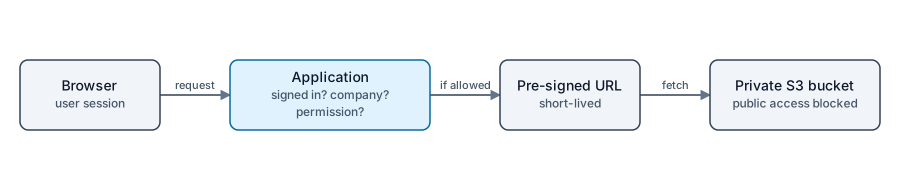
The application is the authority. S3 serves only what it is told to.
How the bucket is set up
- Block Public Access is on.
- Objects are encrypted at rest.
- Access logging is enabled, so file access leaves a record.
- CORS allows only the application’s own origin.
- Staging and production use separate buckets with their own configuration.
Why not public URLs
A public or guessable URL turns a link into a permission. Anyone who copies it, forwards it, or finds it in a log can open the file.
A pre-signed URL ties access to a decision the application just made, and it stops working soon after.
Uploads and downloads
Pre-signed URLs also let the browser upload directly to S3, which keeps large files off the application server. Upload and download permissions are separate decisions, and I handle them separately.
What I would still watch
The URL is a bearer token while it is valid, so I keep the lifetime short and avoid logging full URLs. Authorization logic needs tests, because a mistake there exposes data across companies.
Takeaway
Treat storage as a dumb vault and the application as the guard. Private storage plus application-level authorization plus short-lived URLs gives you several independent layers.
For related work, see the RE/AMP case study and the custom web applications service.