Distributed Playwright Crawler Case Study
A crawler designed so a dead worker does not lose the job
Crawling one page is easy. Crawling thousands reliably is harder, because browsers crash, proxies get blocked, and sites change their markup without warning.
I built a multi-worker crawler on Playwright that collected publicly available county and city information for real estate investors. I designed it around the idea that failure is normal, and that one bad parcel should never take down the rest.
The problem
Real estate investors want property data that sits on public county and city sites. Those sites are slow, uneven, and different from each other. A single script on one machine is too slow, and when it dies nobody knows where it stopped.
How the work was organized
The unit of work was a parcel, identified by the county’s geographic ID. Jobs covered sets of parcels, and each worker claimed a batch of roughly 10 to 20 at a time. The batch size depended on the job type, since a bulk update and a one-off lookup need different things.
Workers claimed rows with a row lock and SKIP LOCKED. That lets many workers pull from the same table without two of them taking the same parcels and without waiting on each other.
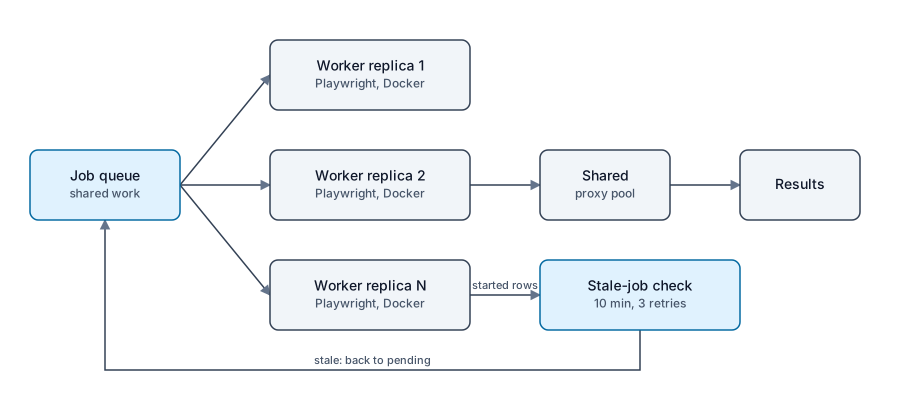
Recovery loop: started rows with no update for 10 minutes go back to pending, and three failures raise an alert.
What I built
Docker replicas that heal themselves
The crawler runs as a set of workers in Docker, scaled by changing the replica count. Containers restart themselves when they fail, so a crashed browser does not need a person.
Getting the cadence right between the replicas and the workers took the most tuning. A failed parcel or job had to stay contained, with a proper failure state and a clear flow after it.
Recovery for interrupted work
When a worker claimed rows, those rows were marked as started. If a started row went more than 10 minutes without an update, the system set it back to pending and added one to its retry count.
Ten to twenty parcels never took anywhere near that long, so 10 minutes of silence meant something was wrong. After 3 failed attempts the row was marked failed and a notification went out. Three failures in a row most likely meant a site had changed its markup or some other problem needed a person.
Proxies
Requests go out through proxies, so no single address carries all the traffic. In my experience the proxies that matter are residential ones, because data center addresses are the ones sites block. Residential proxies are harder to get.
I built a proxy sharing service that the workers pulled from. It kept a pool of proxies, checked them, and monitored the list, so workers did not each manage their own.
Health checks and monitoring
Health checks and monitoring make the crawler observable. Prometheus and Grafana show what the workers are doing and when something is wrong.
The hard part
The hard part of a crawler is not loading a page. It is making sure a worker can disappear halfway through a job without losing that job for good, and without letting a bad parcel stall the rest.
That requirement shaped everything else: how work is claimed, how stale work is detected, and when the system gives up and asks for help. I wrote the recovery idea up on its own in How I Recover Stale Crawler Jobs.
What I do not claim
I have no crawl volume, throughput, or success-rate figures to publish, so I do not state any. The batch sizes and time limits above are from memory of how the system ran. This write-up describes the design, not benchmark results.
Related
The data pipelines and automation service covers this kind of work. For another approach to hard constraints, read the phone scrubber.
Pipeline proof
Data pipeline and automation facts.
- Dataset
- 3.5 GB
- Texas sold-vehicle dataset filtered with Python into reporting data.
- Ad feeds
- Google and Facebook
- Go pipeline still used for inventory marketing.
- Ad budgets
- $10K - $40K monthly
- Across all 13 stores at World Car.